
So, you want to know how much a digital picture frame costs? Most digital photo frames cost between $60 and $600. The price depends on what you need. Some frames only show simple slideshows. Others, like Novarhome, have smart features and look stylish. Bigger screens or more options can make the price go up. But there is a frame for every budget. If you want the best digital photo frame, you will see that features, size, and brand change the price a lot.
Key Takeaways
- Digital picture frames cost between $30 and $600. There are choices for every budget and need. Entry-level frames do not cost much. They are great for showing simple photos. Mid-range models have more features. These can have Wi-Fi and bigger screens. Premium frames have the best features. They can show 4K pictures and work with smart homes. These are good for people who like technology. Think about what you need, like screen size and resolution. Also, look at how the frame connects to other devices. This will help you pick the best digital photo frame for your home. Shop when there are sales. Compare prices to find the best deal on your digital picture frame.
Digital Picture Frame Pricing

You may ask, "how much is a digital photo frame?" The answer depends on what you want. At first, digital picture frame pricing can seem confusing. But it gets easier when you look at each category. Let’s see what you get for your money in each price range.
Entry-Level Pricing
If you want a basic digital photo frame, you do not need to spend much. Entry-level models usually cost between $30 and $100. These frames show your photos in a simple slideshow. They often have smaller screens. You might not get Wi-Fi or app support. But you still get a fun way to show your favorite pictures.
Here’s a quick look at some popular entry-level models:
| Model Name | Size | Price |
|---|---|---|
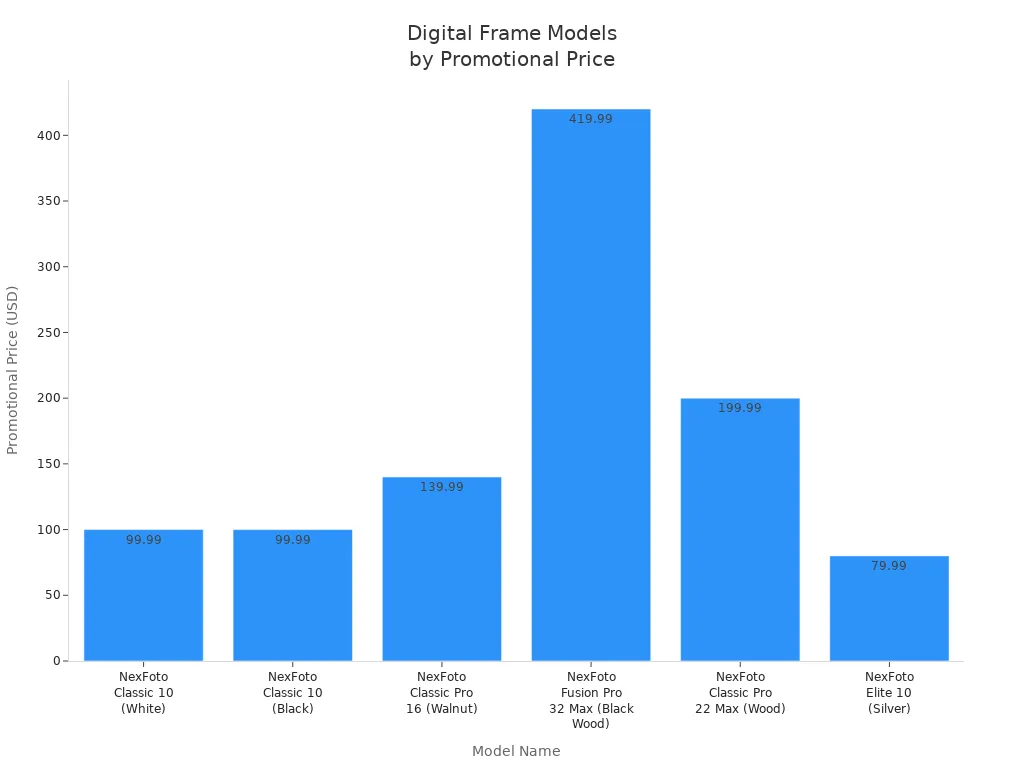
| NexFoto Elite 10 | 10.1 inch | $79.99 |
| NexFoto Classic 10 | 10.1 inch | $99.99 |
| Frameo WiFi Frame | 10.1 inch | $42.99 |
Most entry-level frames have only basic features. You get a smaller screen, simple controls, and not much storage. If you just want to see your photos on a screen, these frames work well.
Tip: Entry-level frames are great as gifts or for your desk at work.
Mid-Range Pricing
You get more features with mid-range digital photo frames. Prices here are usually between $100 and $200. Brands like Aura and Skylight are popular in this group. You will see bigger screens and better image quality. These frames also have Wi-Fi. Many let you send photos from your phone or use an app.
Check out this table to see how mid-range models compare:
| Model Name | Size | Promotional Price |
|---|---|---|
| Aura Digital Picture Frame | 10.1 inch | $139.00 |
| NexFoto Classic Pro 16 (Walnut) | 15.6 inch | $139.99 |
| NexFoto Classic Pro 22 Max | 21.5 inch | $199.99 |
Mid-range frames often have HD displays and more storage. They also have easy-to-use apps. You can share photos with family, even if they live far away. These frames look nice in your living room or kitchen.
- Most mid-range frames have Wi-Fi and app support.
- You get better displays and more storage.
- Brands like Aura and Skylight are leaders here.
Premium Pricing
Premium digital photo frames cost over $300. Some can cost $600 or more. These frames have the biggest screens and the best displays. They also have lots of smart features. You might see 4K resolution, cloud storage, and smart home tools. Some premium frames, like the Amazon Echo Show 15, can be kitchen hubs or family organizers.
Here’s a table with some top premium models and their unique features:
| Model | Unique Features |
|---|---|
| Skylight | Simple email sharing, easy for everyone |
| Aura | High image quality, app-based control, no subscription fees |
| Nixplay | Free cloud storage, energy-saving sensors |
| Pix-Star | Web interface, email sharing, no subscription |
| NearHub | Air quality monitoring, high-res display, no subscription fees |
Premium frames often include:
- Large, high-resolution screens (up to 32 inches)
- Cloud integration and smart features
- Calendar, weather, and even facial recognition
For example, the Amazon Echo Show 15 (15.6-inch) costs $299.99 and works as a kitchen hub. The NexFoto Fusion Pro 32 Max (32-inch) is $419.99. These frames do more than just show photos. They help you organize your life.
Note: Premium frames are perfect if you want the newest tech and a centerpiece for your home.
What Affects the Price?
You may wonder, "Why do prices change so much?" Here’s a quick table to show what features change the price:
| Feature | Impact on Cost |
|---|---|
| Screen Resolution | Higher resolution increases cost |
| Connectivity Options | WiFi and cloud features raise prices |
| Storage Capacity | More storage leads to higher costs |
| Design and Build | Premium materials increase price |
So, when you look at digital picture frame pricing, think about what you need most. Do you want a simple frame for your desk? Or do you want a smart organizer for your family? There is a digital photo frame for every budget and need.
Digital Photo Frame Features
When you shop for a digital photo frame, you’ll quickly notice that different models offer a wide range of features. Each feature affects not only how you use the frame, but also the overall price and viewing experience. Understanding these differences helps you choose the best digital photo frame for your needs and budget, especially if you plan to display family photos or videos long-term.
Screen Size & Resolution
Screen size is usually the first feature people pay attention to when choosing a digital photo frame. Smaller frames, such as 7-inch or 8-inch models, are ideal for desks, nightstands, or shelves where space is limited. They work well for personal use in bedrooms, offices, or dorm rooms.
Larger digital photo frames, typically 15 inches or more, create a stronger visual impact and are better suited for living rooms, kitchens, or wall-mounted displays. While bigger screens often come at a higher price point, they make photos easier to see from across the room and feel more like framed artwork.
Resolution is just as important as screen size. Resolution refers to the number of pixels displayed on the screen, and it directly affects image clarity and sharpness. Higher resolution digital photo frames produce clearer details, smoother edges, and more lifelike colors.
To get the best viewing experience, it’s important to match screen size with the appropriate resolution. For example, a 1080p (Full HD) resolution on a 7-inch digital photo frame delivers very crisp and detailed images. However, on a larger 15-inch frame, a 4K resolution provides better sharpness and prevents photos from looking stretched or blurry. This balance between size and resolution is key to enjoying your photos the way they were meant to be seen.
Here’s a quick look at common sizes and resolutions:
| Size (inches) | Common Resolution (pixels) |
|---|---|
| 7 | 800x600 |
| 8 | 800x600 |
| 10 | 1024x768 |
| 15 | 1920x1080 |
| 17 and above | 1920x1080 or higher |
If you want a digital picture frame that shows off your photos in the best way, look for high resolution and the right size for your space. Higher resolution and bigger screens usually mean a higher price, but they also give you a better viewing experience.
Connectivity Options
How you add photos to your frame makes a big difference. Some digital photo frames use USB drives or SD cards. Others have WiFi or Bluetooth. WiFi-enabled frames let you send photos from your phone or computer, even if you are far away. This is perfect for families who want to share memories in real time.
Frames with WiFi and app support cost more, but they make sharing easy. For example, Aluratek and other brands offer free apps for uploading photos. Bluetooth lets you send pictures from your phone without wires. These advanced features add to the price, but they also add a lot of convenience.
Here are some popular models with WiFi and app support:
| Model Name | Features | Price |
|---|---|---|
| iHome Picture Frame with 3 USB Chargers, Accommodates 5x7 or 4x6 Photos | Wi-Fi, app support | $39.99 |
| Digital Picture Frame with Wifi and 32G Memory, Compatible with Frameo App – Oak Wood | Wi-Fi, app support | $79.99 |
| Digital Picture Frame with Wifi and 16G Memory, Compatible with Frameo App – Black | Wi-Fi, app support | $139.99 |
If you want to save money, you can choose a frame without WiFi. If you want to send photos from anywhere, pick a frame with WiFi and app support. Some frames also offer cloud storage, but you may need to pay a subscription fee for extra space.
Storage & Media Support
Storage tells you how many photos and videos you can keep on your frame. Basic models may have only 128MB of space. Standard frames often have 4GB or 8GB. Premium frames can have up to 32GB. More storage means you can show more photos without swapping memory cards.
Here’s a quick guide to storage:
| Storage Capacity | Number of Photos Approx. |
|---|---|
| 4GB | ~30,000 |
| 8GB | ~50,000 |
| 128MB | Varies |
| 32GB | Varies |
Most digital photo frame options support common file types like JPEG, PNG, BMP, and GIF. If you want to show videos, check if the frame supports video files. More storage and more media support usually raise the price, but they give you more ways to enjoy your memories.
Touchscreen & Controls
Touchscreens make digital photo frames easy to use. You can swipe through photos, zoom in, or change settings with your finger. Some frames use buttons or a remote control instead. Touchscreens feel modern and simple, but they often cost more.
If you want a frame for kids or older family members, a touchscreen can help. You do not need to learn new buttons or menus. Some frames also have voice controls or smart home features. These extras add to the price, but they make the frame more fun and useful.
Design & Build Quality
The look and feel of your digital photo frame matter, too. Some frames have a classic wood look. Others use metal or modern plastic. A strong frame lasts longer and looks better in your home.
Here are a few models known for their design and build quality:
- Bsimb 10" Wi-Fi Digital Picture Frame: Looks like a classic frame, shows bright photos, and plays videos well.
- Arzopa D14 Metal Digital Picture Frame: Has a stylish brass border and is easy to set up.
- Nixplay 10.1" Digital Picture Frame: Has a sharp display, simple controls, and a smart design.
If you want a frame that matches your style, look for one with a finish and shape you like. Better materials and design can raise the price, but they also make your frame a centerpiece.
Tip: Some people want battery operated digital photo frames for more flexibility. Most frames plug into the wall, but a few models use batteries for short-term use or travel.
Other Features That Affect Price
- WiFi and app support make sharing easy but cost more.
- Some frames offer free cloud storage, while others charge a monthly fee. For example, Aura frames give you unlimited cloud storage with no subscription. Other smart frames may charge $5 to $15 per month for extra space.
- Video and photo display support add value and flexibility.
When you compare digital photo frame options, think about which features matter most to you. The right mix of size, resolution, storage, and design will help you find the best frame for your budget and your home.
Compare Digital Photo Frames

Popular Brands Overview
There are lots of digital photo frames to pick from. Some brands are popular because they have cool features and good prices. Here’s a table that shows how top brands are different:
| Brand | Features | Price Range | Customer Satisfaction |
|---|---|---|---|
| Aura | Minimalist design, excellent color accuracy | $200 - $300 | High |
| Nixplay | Video playback, social media integration | $100 - $200 | Moderate to High |
| Skylight | Touchscreen, email-based photo sharing | $150 - $250 | High |
Aura looks simple and is easy to set up. Nixplay lets you watch videos and use social media. Skylight helps you share photos, even if you do not use much technology.
Tests show Aura frames have really good screens. Nixplay gives you a lot for your money. Skylight is a great gift because it is simple to use.
Novarhome Digital Calendar Chore Chart
Novarhome is more than a traditional digital photo frame. Unlike standard frames that only display pictures, Novarhome combines family organization and visual memories into one smart device. The Novarhome Digital Calendar Chore Chart is designed to help families stay organized while still enjoying photos and videos of their favorite moments.
With built-in features for chore tracking, meal planning, and family scheduling, Novarhome works as a shared household command center. Parents can assign chores, track completion, and set rewards, making daily routines clear and motivating—especially for kids. At the same time, the device functions as a full-featured digital photo and video frame, keeping family memories on display.
You can choose between 10.1-inch and 15.6-inch touchscreen sizes, both available in classic black or white finishes that blend easily into any home décor. The HD touchscreen display is bright, responsive, and easy for all ages to use, whether you are checking today’s chores or swiping through family photos.
Using the mobile app, family members can share photos and videos remotely, update schedules, and stay connected—even when they are not at home. This makes Novarhome especially useful for busy households, blended families, or grandparents who want to stay involved in daily family life.
By combining a digital calendar, chore chart, and smart photo frame in one device, Novarhome becomes more than a piece of electronics—it becomes a family organization hub. If you are looking for a digital photo frame that delivers real everyday value beyond displaying pictures, Novarhome offers excellent functionality for the price.
Value Picks by Price
You want a digital photo frame that fits your budget. Here’s a table that shows what you get for different prices:
| Price Range | Features Offered | Value Proposition |
|---|---|---|
| $30 - $50 | Basic models with slideshow and decent display | Good for simple needs |
| $100 - $300 | Wi-Fi, bigger screens, higher resolution, app support | Great for sharing and better viewing |
| $300 and up | Smart features, large HD screens, multifunctional tools | Best for families and home organization |
If you want a simple frame, you do not need to spend much. If you want Wi-Fi or a bigger screen, you pay more. If your family wants everything in one frame, Novarhome is a great pick.
Buying Guide
Essential Features
When you want to buy a digital picture frame, you should think about the most important features. These features help you get the best deal and make sure your frame works for you. Here are some things to look for:
- Display Quality: Pick a 1080p screen so your photos look clear.
- Screen Size: Decide where you will put your frame. Small frames are good for desks. Big frames look nice on walls.
- Storage and Connectivity: Choose a frame with enough space for your pictures. Some frames hold thousands of photos.
- Smart Features: Some frames play videos, show weather, or let you send photos from your phone.
- Design and Orientation: Find a style that fits your home. Many frames can stand up tall or lay sideways.
You can use this table to see which features fit your budget:
| Feature | Description |
|---|---|
| Screen Size | Sizes go from 7-inch to 19-inch; think about where you want to put it. |
| Resolution | Get at least 1024 x 600 pixels; more pixels make pictures look better. |
| Internal Memory | Built-in storage goes from 4GB to 32GB; more memory is good for lots of photos. |
| Wi-Fi Integration | Lets you upload photos from your phone; check if the frame has Wi-Fi. |
| User Interface | Easy touch screens or remotes make the frame simple to use. |
| Price and Warranty | Frames come in many prices; pick one that fits your budget and has a good warranty. |
Premium Upgrades
If you want more than just the basics, premium upgrades can make your digital photo frame even better. These extras cost more, but they give you more ways to enjoy your pictures and help you stay organized.
| Feature/Benefit | Description |
|---|---|
| Enhanced Viewing Experience | Bigger, sharper screens make photos look amazing. |
| Superior Build Quality | Strong frames last longer and work better. |
| Advanced Connectivity | Wi-Fi and cloud let you share photos from social media. |
| Versatile Slideshow Options | You can pick the order your photos show up. |
| Unique Features | Some frames show weather, have calendars, or use apps. |
| Remote Photo Sending | Send photos to your frame from anywhere, even far away. |
| Family and Elderly User Friendly | Easy features make the frame simple for everyone to use. |
You might want these upgrades if you like new technology or want something for your whole family.
Tips for Best Deals
You want to save money when you buy a digital photo frame. Here are some tips to help you find the best price:
- Shop during big sales like holidays or back-to-school time. Prices are lower then.
- Sign up for store emails to get special deals and early sales.
- Look for bundles with extra parts or longer warranties.
- Use price matching to make sure you pay the lowest price.
- Check cashback sites and use credit card points to save more.
- Think about buying a used or fixed-up frame for less money.
- Always pick the features you need most, like a good screen, enough space, and Wi-Fi.
If you are not sure where to buy, check both online and local stores. Online shops usually have more choices and better prices. When you buy, look at the total price, including setup and warranty.
Tip: Buy when you see a good sale, especially during big events. The best digital picture frame is the one that fits your budget and has the features you want.
Digital picture frames can cost between $30 and $600. Cheaper models show simple slideshows. Expensive frames have smart features and large screens. You should think about how much you want to spend. Also, think about what features you need. If you want more than a frame, Novarhome is special. It helps your family stay organized with a calendar, chore list, meal planner, and photo sharing. Look at your choices, pick what works for you, and shop wisely!
FAQ
How much does a digital picture frame cost?
You can find digital picture frames from $30 to $600. Most people spend between $100 and $300 for a good one. The price goes up if you want a bigger screen or smart features.
What features make a digital picture frame more expensive?
Bigger screens, HD or 4K displays, Wi-Fi, and app support raise the price. Frames with calendars, chore charts, or meal planners, like Novarhome, also cost more because they do more.
Can I get a good digital picture frame on a budget?
Yes! You can find simple frames for under $100. These show slideshows and look nice on a desk. If you want Wi-Fi or a bigger screen, you might need to spend a bit more.
Do I need to pay monthly fees for digital picture frames?
Most frames do not need monthly fees. Some offer cloud storage or extra features for a small fee. Always check before you buy so you know what to expect.
What is the best value digital picture frame for families?
If you want more than just photos, Novarhome gives you a calendar, chore chart, meal planner, and photo sharing in one frame. It helps your family stay organized and connected.